Quick Summary
- Strong marketing technology fixes one slow handoff, such as lead routing or reporting, before it adds anything new.
- Agree on definitions and naming rules first, because tools only multiply whatever mess is already there.
- Match the tool to the size of your problem: a CRM feature often beats a new platform for small teams.
- Give every tool an owner and a ninety-day adoption check, and cancel anything nobody opens weekly.
Most marketing stacks grew by accident: one tool for email, another for forms, a spreadsheet to join them. If you are planning to tidy yours, marketing technology consulting usually begins by looking at the handoffs between tools, not the tools themselves.
Here are ten setups I see working in real stacks. Each one shows the idea, the steps and the tools that carry it. If you want to know how common these stacks are across the industry, my collection of marketing technology statistics has the wider numbers.
The Ten Setups at a Glance
| Example | What it does | Part of the stack |
|---|---|---|
| 1. Lead Routing With Instant Assignment | Lead routing | Sales handoff |
| 2. Lifecycle Email From Behavior | Behavior-triggered email | Retention |
| 3. A Customer Data Platform for One View of the Buyer | Unified customer profiles | Data |
| 4. Attribution Reporting in One Dashboard | One-page reporting | Reporting |
| 5. Marketing and Sales Handoff With Scoring | Agreed lead scoring | Sales handoff |
| 6. Consent and Preference Management | Consent records | Compliance |
| 7. Social Publishing and Listening in One Workflow | Calendar and listening | Social |
| 8. Landing Page and Experiment Testing | Template testing | Conversion |
| 9. Content Operations With a Single Source of Truth | Shared workspace | Content |
| 10. Marketing Operations Intake and Request Tracking | Request queue | Operations |
Ten Setups You Can Copy
Read each one with your own stack open next to it. If you are not sure where your stack hurts most, a structured marketing technology audit will tell you which of these deserves your first week.
Lead Routing With Instant Assignment
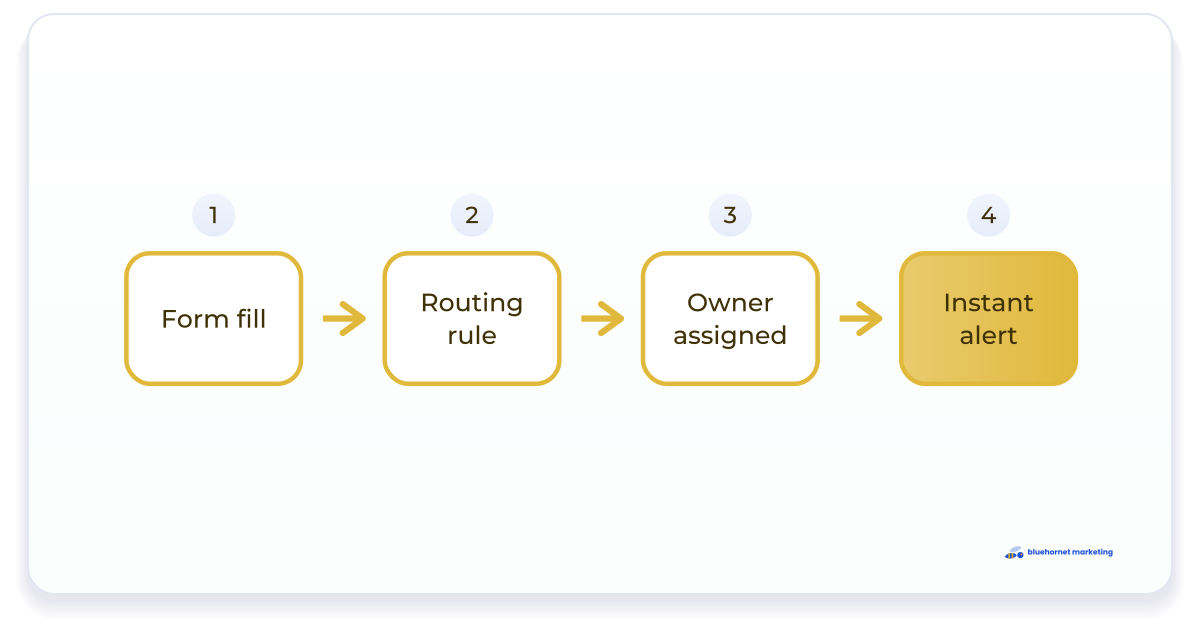
A form fill lands in the CRM, gets matched to an account and an owner by territory or company size, and reaches that person's phone within a minute. I like it as a first example because the fix is small and the effect is easy to see. Leads that wait a day cool off, and routing rules remove the wait.
Most teams that come to me route leads by hand from a shared inbox. After a rules-based setup, I typically see the median first-touch time fall from several hours to minutes. The catch is data quality: routing breaks when company names are misspelled or territories overlap, so you need a clean owner table before you automate.
How the Routing Works
- Write down your routing rules in plain sentences, including tie-breakers.
- Clean the owner and territory fields in the CRM.
- Build the rules as workflow steps, with a fallback owner for edge cases.
- Send the owner an alert in chat or on mobile, with the lead's source and page history.
- Track time to first touch weekly and review misrouted leads monthly.
Tools for Routing
Most CRMs include assignment rules, and an automation tool such as Zapier or Make handles the cases that fall outside them. Add an enrichment service only if form data is too thin to route correctly.
Lifecycle Email From Behavior
Instead of one newsletter, customers receive messages triggered by what they did: browsed a product, abandoned a cart, finished onboarding or went quiet. The messages are short and tied to a moment, so they feel useful rather than promotional. Ecommerce brands in particular get a large share of email revenue from these flows.
The setup effort is modest compared with the effect, which is why I suggest a welcome flow, an abandoned-cart flow and a win-back flow before anything fancier. The common failure is too many overlapping flows, which sends one customer five messages in a day. A simple suppression rule that pauses other flows when one fires fixes most of that.
Steps to Build the Flows
- Pick three moments in the customer journey with a clear trigger.
- Write one short message for each, with one action per email.
- Set suppression rules so a person is in one flow at a time.
- Send a test through each flow on real devices.
- Review revenue per recipient and unsubscribe rates after four weeks.
Tools for Lifecycle Flows
Klaviyo, Customer.io, ActiveCampaign and Braze all cover this, with different strengths. Pick the one that connects to your store or product database with the least custom work.
A Customer Data Platform for One View of the Buyer
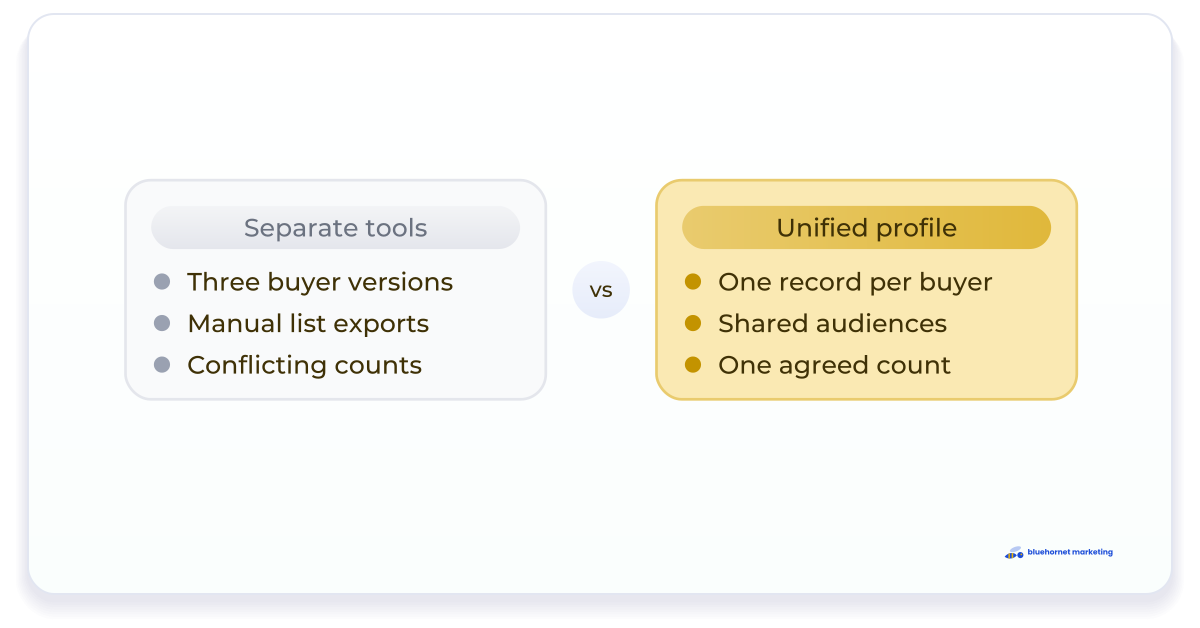
A customer data platform collects events from your site, app, billing and email into one profile per person. Marketing can then build an audience, such as trial users who invited a teammate, and send it to ads and email without a developer. The value is consistency: every tool sees the same customer.
I would not recommend a customer data platform to a company with a few thousand contacts and one email tool. It pays off when you have several systems that each hold part of the picture and you keep exporting spreadsheets to stitch them together. Expect the first month to go into naming events consistently, which sounds dull and decides whether the profiles are usable.
Setting Up the Profiles
- List the events that matter, such as signup, activation and purchase.
- Agree on one naming scheme and write it down.
- Connect the sources and check that profiles match the right people.
- Build two audiences and send them to your email and ad tools.
- Audit event quality every quarter.
Tools for Unified Profiles
Segment, RudderStack and the data features inside larger marketing suites cover this. Smaller teams can often get far with their CRM's own audience features first.
Attribution Reporting in One Dashboard
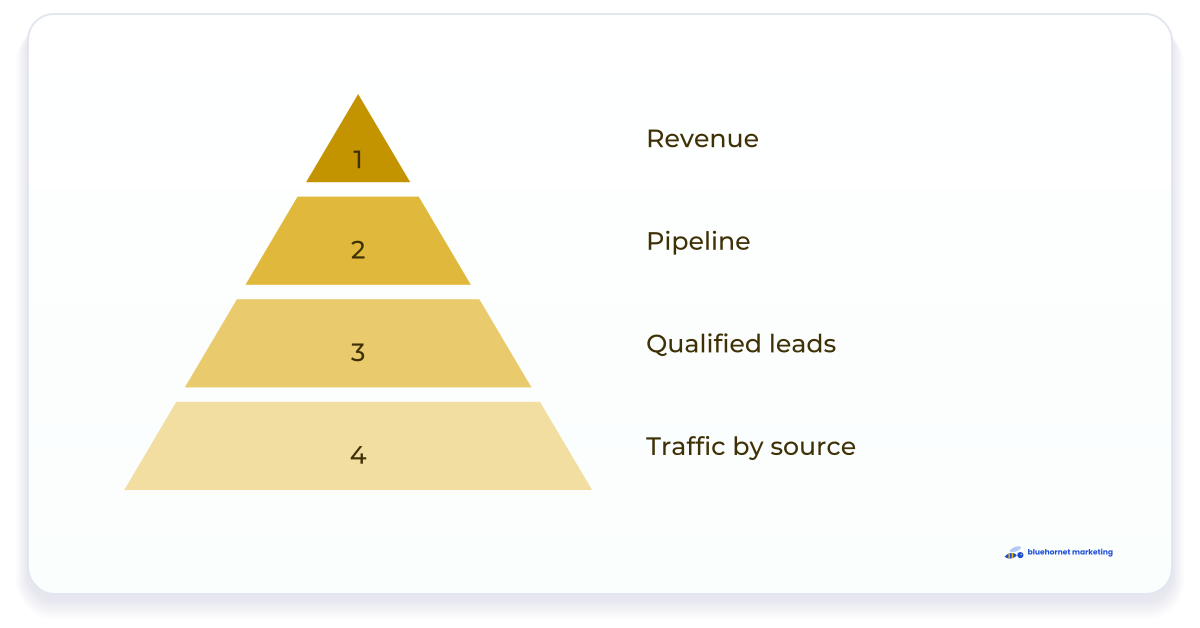
The marketing lead opens one dashboard that shows leads, pipeline and revenue by source, using the same definitions everyone agreed on. It replaces monthly spreadsheet merges and the argument about whose numbers are right. Reports update from the CRM and ad platforms on a schedule.
No attribution model is perfect, and I say that to every client. Pick a simple one, such as first touch for sourcing and last touch for conversion, and apply it consistently so trends are comparable. The dashboard's real value is the shared definition, since two teams using different rules will never agree on what a lead is.
Building the Dashboard
- Agree on definitions for lead, qualified lead and customer.
- Standardize UTM tags and write them in a short naming guide.
- Connect the CRM and ad platforms to a reporting tool.
- Build a one-page dashboard with five to seven metrics.
- Review it in the weekly meeting so it stays in use.
Tools for Reporting
Looker Studio is a common free starting point, and many CRMs have built-in reports. Move to a warehouse and a business intelligence tool when data volumes or questions outgrow them.
Marketing and Sales Handoff With Scoring
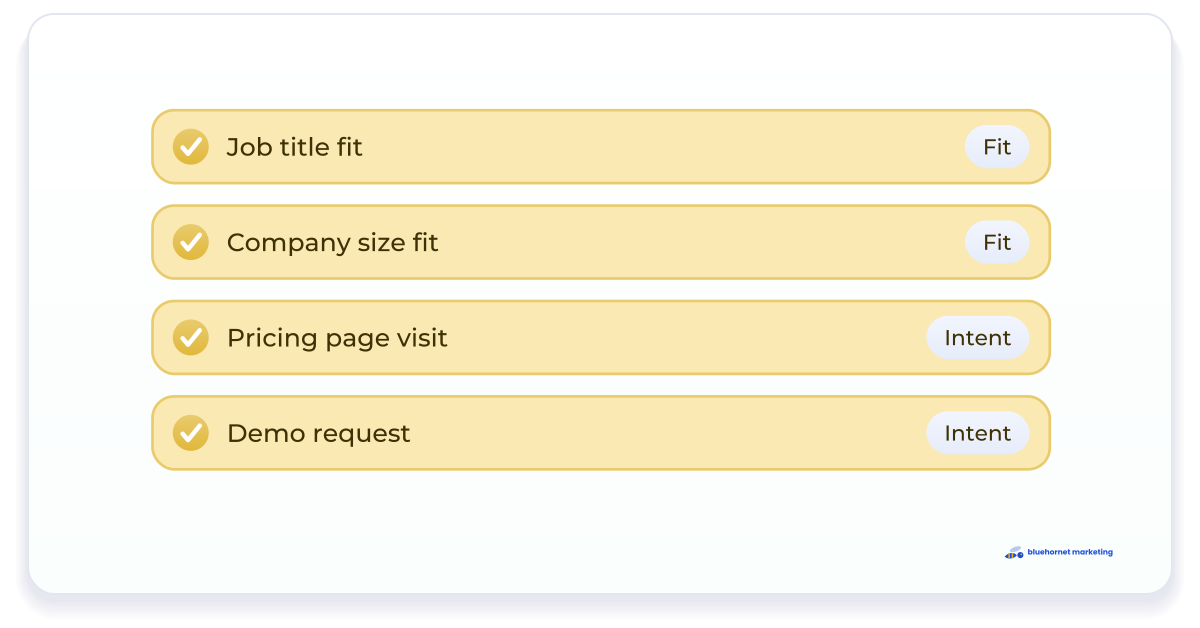
Leads receive a score based on fit and behavior, and sales gets a clear alert when a lead crosses a threshold. The rules are agreed between marketing and sales and reviewed together every quarter. Sales stops ignoring marketing leads because they know what the score means.
The first scoring model I build is deliberately simple: a few points for company size and role, a few for high-intent pages such as pricing, and negative points for student or competitor emails. A complex model is harder to trust. If sales distrusts the score, the system fails no matter how good the math is, so involve them from the first draft.
From Rules to Alerts
- Interview sales about what the best leads look like.
- List fit and behavior signals, with points for each.
- Set a threshold and a follow-up service level, such as contact within a day.
- Review accepted and rejected leads together every month.
- Adjust points based on which scored leads actually became customers.
Tools for Scoring
HubSpot, Salesforce and ActiveCampaign include scoring features. Start with what your CRM provides before buying a separate predictive tool.
Consent and Preference Management
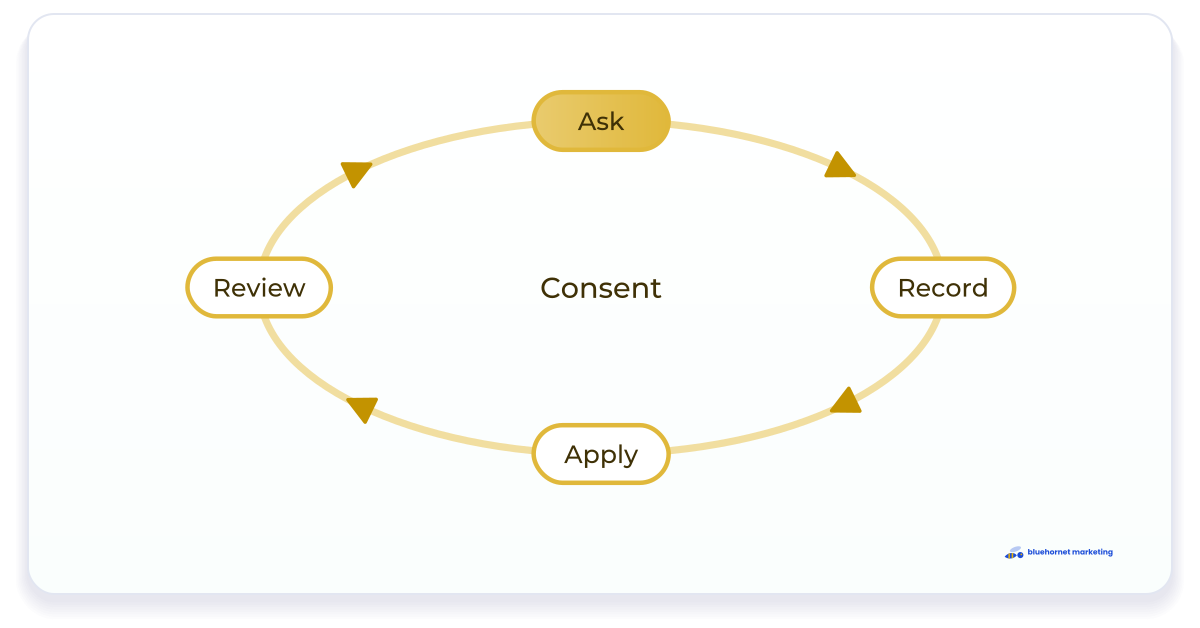
Visitors choose what they agree to, the choices are stored against the contact and every tool respects them. A preference center lets subscribers pick topics and frequency instead of leaving entirely. List quality improves because people receive what they asked for.
The compliance side matters, but so does the practical side: a clear consent record prevents deliverability problems and unhappy customers. Rules differ by region and change over time, so confirm current requirements with a qualified adviser. My practical advice is to make unsubscribing and topic choice easy, since a clean list outperforms a large unhappy one.
Making Consent Work
- Audit the forms and tools that collect or use personal data.
- Add a consent banner that actually blocks tags until the visitor agrees.
- Store consent status in the CRM against each contact.
- Build a preference center with a few clear topics.
- Test the unsubscribe flow end to end every quarter.
Tools for Consent
A consent management platform handles the banner and tag blocking, and your email tool or CRM stores preferences. Ask your legal adviser to review the setup.
Landing Page and Experiment Testing
Campaign pages are built from templates, each with one goal, and variants are tested against a control. The team learns which headline, form length and proof point lift conversion. Wins roll into the template library so the next page starts stronger.
Testing pays only when you have enough traffic, so I check volume before I recommend a tool. A page with a few hundred visits a month needs a bold change and a long window, not a tiny color tweak. A template library with proven blocks gives most teams more lift than a testing platform does.
Setting Up the Tests
- Create two or three page templates with a single call to action each.
- Define the primary conversion and the minimum traffic for a test.
- Test one element at a time, such as the headline or the form.
- Record every result in the experiment log.
- Add winning blocks to the template library.
Tools for Page Testing
Landing page builders and experimentation platforms cover this, and CRM forms handle the capture. Check that the tool sends conversion data back to your CRM.
Content Operations With a Single Source of Truth
Briefs, drafts, approvals and publishing dates live in one workspace, with assets stored in a shared library. Writers know what is due and editors know what is waiting. The same asset is reused across email, web and social without hunting for the latest file.
Content teams lose more time to searching and chasing than to writing. A shared brief template, a naming rule and a weekly status view often recover several hours per person. I add a short checklist for every piece, covering the keyword target, the call to action and the internal links, so quality does not depend on who reviews it.
Organizing the Workspace
- Create one brief template and one naming rule.
- Set statuses such as brief, draft, review and scheduled.
- Store final assets in a shared library with clear folders.
- Hold a short weekly status check on blocked items.
- Archive old versions so the latest file is obvious.
Tools for Content Operations
Project tools such as Asana, Notion or Trello can hold the workflow, and a shared drive or digital asset manager holds the files. Keep the setup simple enough that people actually use it.
Marketing Operations Intake and Request Tracking
Requests for campaigns, reports or list pulls come through one form into a queue with owners and due dates. Stakeholders can see status without asking. The team can finally say what it is working on, what is waiting and why.
I add this example because it fixes a human problem with a technical tool. When requests arrive by chat and email, the loudest request wins and nothing is tracked. A simple intake form and a weekly priority review make capacity visible, and that visibility changes the conversation with leadership.
How Requests Move
- Build a short intake form with the goal, audience and deadline.
- Route requests into a queue with a named triage owner.
- Set service levels by request type.
- Show the queue to stakeholders in a shared view.
- Review capacity and delays monthly.
Tools for Intake
A form tool feeding a project board covers most needs. Larger teams can use the request features in their work management software.
What These Setups Cost in Time and Effort
Effort depends less on the software than on cleanup. In my client work, the first week of nearly every project goes to fixing field names, duplicate contacts and tracking tags. Plan for that before you plan for the tool.
| Setup | Typical build time | Main dependency | Common pitfall |
|---|---|---|---|
| Lead routing | 1 to 2 weeks | Clean owner data | Overlapping territories |
| Lifecycle email | 3 to 6 weeks | Event data from store or product | Overlapping flows |
| Customer data platform | 6 to 12 weeks | Agreed event names | Mismatched profiles |
| Attribution dashboard | 2 to 4 weeks | Consistent UTM tags | No shared definitions |
| Lead scoring | 2 to 3 weeks | Sales agreement | An overly complex model |
| Consent management | 2 to 4 weeks | Tag inventory | Tags firing before consent |
| Social workflow | 1 to 2 weeks | Account access | Paying for unused features |
| Landing page testing | 2 to 4 weeks | Enough traffic | Tiny tests with no signal |
| Content operations | 1 to 3 weeks | One brief template | Too many statuses |
| Request intake | 1 week | A named triage owner | Ignoring the queue |
These ranges come from projects I have handled and shift with team size. Sequencing matters as much as the list, and the marketing technology roadmap shows how to order several of these setups over two or three quarters.
How to Choose Which Setup Comes First
Rank your pain by the cost of delay. A slow lead response costs revenue every day, while a messy asset library costs hours. Start where delay costs the most, then check that you have the data and an owner for it.
- You can name the handoff that loses the most time or leads.
- You know who owns the process and the tool.
- The data the setup needs is clean enough to use.
- You have a way to measure the result within a month.
Before buying software, check what your current tools already do. Many of these setups run on features you have paid for, and my ranking of martech tools shows where an upgrade is worth the money. If you are unsure whether your team is ready to run several at once, the marketing technology assessment gives you a readiness score before you commit.
Questions About Marketing Technology Setups
What Are Examples of Marketing Technology?
Common examples include CRM systems, email and marketing automation platforms, analytics and attribution tools, customer data platforms, social publishing tools, landing page builders and consent managers. What counts as marketing technology is the use: software that helps you attract, convert or keep customers.
Which Marketing Technology Example Should I Start With?
Start with the one that fixes your slowest handoff. For many teams that is lead routing or a clean reporting dashboard, because both are small projects with visible results. Avoid starting with a customer data platform unless you already have several systems that cannot share data.
How Much Does a Marketing Technology Stack Cost?
It varies widely with team size and tools. A small team may spend a few hundred dollars per month on a CRM, email platform and analytics, while mid-sized stacks run into thousands. Compare costs with the hours and revenue each tool protects, and review the stack every year.
Do I Need a Customer Data Platform?
Not at first. If your CRM and email tool share data well, you can wait. A customer data platform helps when many systems hold parts of the customer record and you spend real time reconciling them by hand.
How Do I Avoid Buying Tools I Will Not Use?
Write the job each tool must do before you look at vendors, run a trial with real data and assign an owner. Review adoption at ninety days. If nobody opens the tool weekly, cancel it.
What Is the Difference Between Marketing Technology and Marketing Automation?
Marketing automation is one category within marketing technology. It covers tools that send messages and update records based on rules. Marketing technology also includes analytics, data, content and social tools that do not automate anything.
How Long Does It Take to Set Up One of These Examples?
Simple setups such as lead routing or a dashboard can take one to three weeks. A lifecycle email program or a customer data platform can take two to three months, mostly because of data cleanup and testing.
Disclaimer: This article is for general information only and isn’t legal, financial or tax advice. Treat figures as estimates from typical work and confirm details with your providers before you act.
Was this guide helpful?
Thanks for your feedback.
Warren Albright
Warren leads the Blue Hornet editorial team and works with the consultants to turn real client projects into practical guides on content, paid media, marketing automation, CRM and analytics. He comes from content and demand generation work, edits every article before a working marketing consultant reviews it, and draws on strategies, channel plans and audits from client projects to keep the advice grounded in real numbers.
Social Publishing and Listening in One Workflow
Posts are planned in a calendar, approved by one person and published across channels, while a listening feed tracks brand mentions and replies. The team spends less time switching between apps and more time responding. Mentions that used to disappear in notifications reach someone who answers them.
I see the biggest time saving in approvals and reporting rather than in scheduling. A single approval step with a clear owner removes long email chains. For small teams, a basic calendar and a shared inbox for mentions already do most of the work, so avoid paying for an enterprise suite you will not use.
Running the Workflow
Tools for Social Workflows
Hootsuite and Sprout Social cover publishing, inbox and reporting, and lighter tools cover scheduling alone. Pick one based on how many accounts and people you manage.