Quick Summary
- Start with free analytics and an all-in-one platform like HubSpot before adding specialist tools.
- Search tools such as Semrush and Ahrefs pay off when organic search is a main channel.
- Account-based platforms like 6sense and Demandbase need clean data, a target list and a sales team ready to act.
- Price the tier you will actually need, since entry prices rarely cover B2B features.
The Best B2B Marketing Tools at a Glance
| Tool | Type | Best for |
|---|---|---|
| 1. HubSpot Marketing Hub | All-in-one marketing platform | Teams that want CRM, email and automation in one place |
| 2. Semrush | SEO and competitive research | Teams that win business through search and content |
| 3. Google Analytics | Web analytics | Any team that needs to see what visitors do on its site |
| 4. Apollo.io | Prospecting and outreach | Small teams building outbound lists and sequences |
| 5. ZoomInfo | B2B data and intelligence | Larger teams that need deep contact and company data |
| 6. Mailchimp | Email marketing | Small teams that need simple email and a free start |
| 7. Ahrefs | SEO and backlink analysis | Teams focused on search rankings and link building |
| 8. 6sense | Account-based marketing and intent | Enterprise teams running account-based programs at scale |
| 9. Demandbase | Account-based marketing platform | Mid-size and enterprise teams with a named account strategy |
The 9 Best B2B Marketing Tools, Ranked
I start with the tools that suit the widest range of teams and move toward enterprise platforms, so you can stop reading when you find your fit. The tool is only part of the result. In my B2B marketing consulting work, a clear plan and clean data decide more than the logo on the invoice, and the B2B marketing examples show what teams do with these tools in practice.
HubSpot Marketing Hub
The Easiest All-in-One Place to Run B2B Marketing From One Contact Record
HubSpot Marketing Hub combines email, forms, landing pages, automation, reporting and a connected CRM in one system.
HubSpot is the platform I most often recommend to B2B teams that have outgrown spreadsheets and a newsletter tool. The main strength is the shared contact record: marketing, sales and service see the same history, so lead handoffs stop depending on exports and guesses. Forms, landing pages, nurture paths and scoring live in one place, and the free tools let you test the system before you pay.
The cost curve is the catch. The Starter tier covers the basics, while the features B2B teams usually want, such as multi-step automation, scoring and attribution reporting, sit in Professional. A team of three can move from a small bill to a large one in a single upgrade, so price the tier you will actually need before you commit.
What I Like About HubSpot Marketing Hub
- One contact record shared by marketing and sales
- A free tier lets you start without a purchase order
- Large library of templates and integrations
What I Don’t Like About HubSpot Marketing Hub
- Costs rise sharply between Starter and Professional
- Contact-based pricing can surprise growing lists
HubSpot Marketing Hub Pricing
HubSpot lists a free plan and paid Starter, Professional and Enterprise tiers. On its pricing page, Professional starts at about $800 per month with three core seats and Enterprise at about $3,600 per month with five core seats, and both add a one-time onboarding fee. G2 shows Starter from $15 per user per month, so confirm the current figures on the vendor page.
HubSpot Marketing Hub Reviews
Semrush
A Broad Toolkit for Search, Content and Competitor Research in One Subscription
Semrush covers keyword research, site audits, rank tracking, competitor analysis and content tools, plus paid search and social modules.
Search is where many B2B buyers start, and Semrush is the toolkit I reach for to find which questions they ask. Keyword research, competitor comparisons and site audits sit side by side, so you can see what rivals rank for and where you have a gap. For a content-driven plan, the topic research alone justifies a month's subscription.
The scope is also the downside. The platform has a lot of reports, and new users spend weeks working out which three matter. Estimates for traffic and keywords are directional, not exact, so use them to compare and prioritize, not to forecast results.
What I Like About Semrush
- Strong competitor and keyword research
- Site audit finds technical issues quickly
- One login for search, content and ad research
What I Don’t Like About Semrush
- The number of reports overwhelms new users
- Data is an estimate and varies between tools
Semrush Pricing
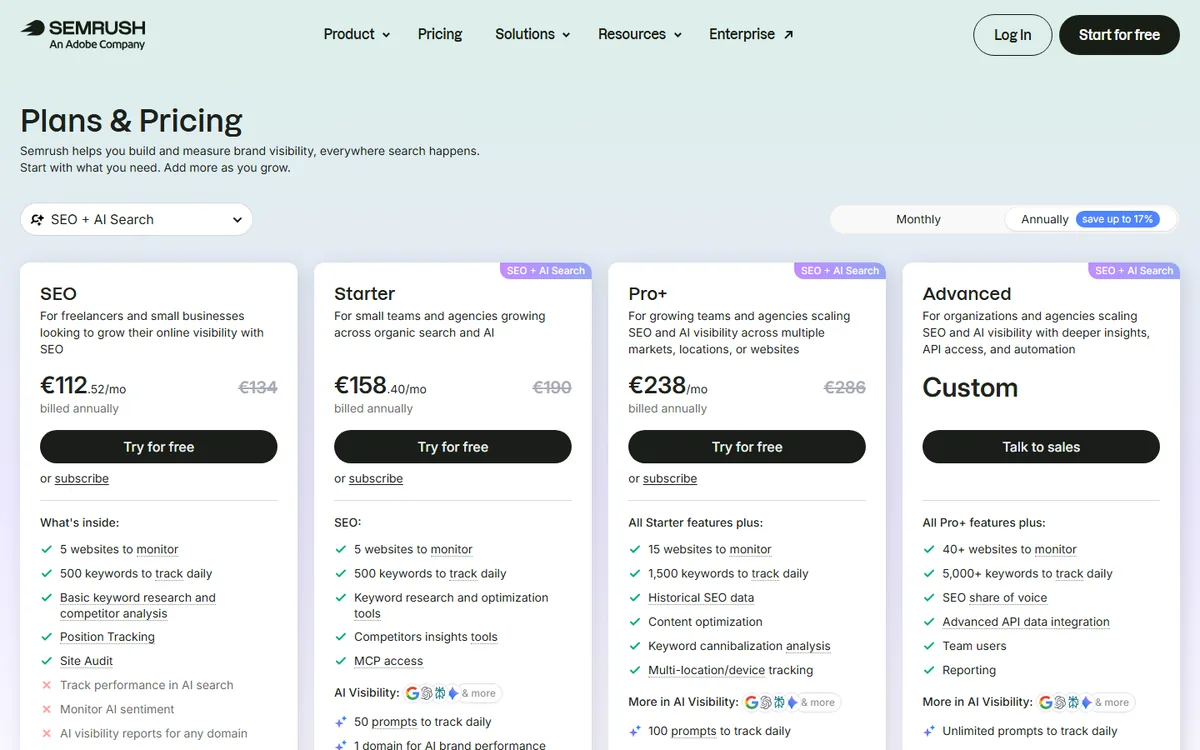
G2 lists Semrush from $139.95 per month for the Pro plan at a flat rate, with separate products such as Semrush Social and Local at lower entry prices. Higher plans add more projects, tracked keywords and history, so check the vendor page for the current tiers.
Semrush Reviews
Google Analytics
The Free Starting Point for Knowing Which Pages and Channels Bring Visitors Who Act
Google Analytics measures website and app traffic, events and conversions, and it is free for standard use.
Every B2B site should have analytics in place before any other tool. Google Analytics shows which channels bring visitors, which pages they read and which actions they take. Set up key events for demo requests and form submissions, and you can compare channels by results instead of visits.
It will not tell you who the visitors are as companies, and it does not see revenue unless you connect it to your CRM. The interface also takes learning, and sampling or thresholds can hide detail on small data sets. For most teams the right setup is Analytics for the site, plus the CRM for what happens after the form.
What I Like About Google Analytics
- Free for standard use
- Works with Google Ads and Search Console
- Flexible event-based tracking
What I Don’t Like About Google Analytics
- Steep learning curve for custom reports
- No view of company identity or revenue by default
Google Analytics Pricing
Google offers standard Google Analytics at no cost. G2 notes a free offering for basic digital analytics and does not list plan prices, so check Google's pages if you need the paid enterprise tier.
Google Analytics Reviews
Apollo.io
A Budget-Friendly Way to Find Contacts and Run Outbound Sequences in One Tool
Apollo.io pairs a large B2B contact database with email sequencing, a dialer and basic analytics.
Apollo gives small teams access to prospecting data and outreach tools at prices well below the enterprise databases. You can build a list by title, industry and company size, add the contacts to a sequence and track replies without leaving the platform. For a team starting outbound, that is hard to beat for the cost.
Data accuracy is the limit. Emails and titles go out of date, so expect some bounces and verify before large sends. Sending volume also needs discipline, because poor list quality hurts the reputation of your domain, and your marketing emails suffer with it.
What I Like About Apollo.io
- Low entry price with a free plan
- Database and sequencing in one place
- Quick to set up
What I Don’t Like About Apollo.io
- Contact data accuracy varies
- Easy to over-send and harm domain reputation
Apollo.io Pricing
G2 lists Apollo.io plans per user per month: Free at $0, Basic at $49 and Professional at $99. An Enterprise plan exists, but its price is not listed there.
Apollo.io Reviews
ZoomInfo
The Deepest Contact and Company Database When You Have Budget and a Clear Target List
ZoomInfo provides contact and company data, buying signals and sales engagement features for B2B teams.
ZoomInfo is a data heavyweight. Company details, org charts, technology use and intent signals help you build precise account lists and decide which accounts to approach first. When your market is a few thousand named companies, that precision saves a lot of wasted outreach.
Pricing is the barrier. Contracts are custom, usually annual and not cheap, and reviewers often mention renewal price increases. I advise testing data quality on a sample of your own target accounts before you sign, and negotiating the renewal terms upfront.
What I Like About ZoomInfo
- Large, detailed company and contact database
- Intent and technology data for prioritizing accounts
- Integrates with major CRMs
What I Don’t Like About ZoomInfo
- Expensive, with custom annual contracts
- Renewals can bring price increases
ZoomInfo Pricing
ZoomInfo does not publish prices on its G2 listing, which shows only a top-tier perceived cost and an average discount of about 15 percent. Expect a custom quote after a sales call.
ZoomInfo Reviews
Mailchimp
A Simple, Low-Cost Place to Start Email Marketing Before You Need a Full Platform
Mailchimp offers email campaigns, templates, basic automation and a free plan for small lists.
Mailchimp suits small B2B teams that mostly need clean newsletters and a few automated emails. Templates are easy, the editor is friendly and the free plan lets you try it with a small list. For a company with fewer than a few thousand contacts, it is often enough.
B2B teams tend to outgrow it. Lead scoring, deep CRM sync and multi-step nurture are stronger in HubSpot or similar platforms. Costs also grow with contact count, so check the price at your list size, not the entry price on the pricing page.
What I Like About Mailchimp
- Free plan and easy editor
- Quick to launch a first campaign
- Large template library
What I Don’t Like About Mailchimp
- Limited B2B scoring and CRM depth
- Price climbs as the contact list grows
Mailchimp Pricing
Mailchimp lists a Free plan limited to 250 contacts, Essentials from $13 per month, Standard from $20 per month and Premium from $350 per month, shown as first-year rates for some plans. The free plan has no automation flows, so check the pricing page for current terms.
Mailchimp Reviews
Ahrefs
A Sharp Tool for Backlinks, Rankings and Finding What Competitors Rank For
Ahrefs provides backlink analysis, keyword research, rank tracking and site audits, with a well-liked free webmaster tool.
Ahrefs is known for its backlink index, and it is the tool I use when a client's question is why a competitor outranks them. You can see who links to a page, which pages earn traffic and which keywords drive it. The interface is clean and the learning curve is gentler than with some rivals.
It is narrower than Semrush, with fewer paid media and social features, and the price is high for small teams. If search is your main channel it earns its keep. If it is one of five, a lower-cost option may be enough.
What I Like About Ahrefs
- Excellent backlink data
- Clean, easy-to-use interface
- Free webmaster tools for your own site
What I Don’t Like About Ahrefs
- Expensive for small teams
- Fewer ad and social features
Ahrefs Pricing
G2 lists a free tier at $0, a Starter plan at $29 and a Lite plan at $129 per month, and notes that a higher tier exists. Reviewers often mention the cost for freelancers and small businesses.
Ahrefs Reviews
6sense
Powerful Buying-Signal Data for Large Teams That Run Account-Based Programs
6sense combines intent data, predictive account scoring and advertising orchestration for account-based marketing.
6sense tells you which accounts appear to be researching your category, even before they visit your site. For a team with a defined target list and a sales team ready to act on signals, that timing is valuable. It also supports advertising to specific accounts across channels.
It needs scale and process to pay off. Without clean CRM data and an agreed follow-up play, the signals sit unused. Reviewers describe a long implementation, and the price puts it out of reach for most small teams.
What I Like About 6sense
- Strong buying-signal and account scoring features
- Account-based advertising in the same platform
- Fits large, structured sales teams
What I Don’t Like About 6sense
- Expensive and complex to implement
- Value depends on process and data quality
6sense Pricing
6sense does not list prices on its G2 page, which shows a top-tier perceived cost, an average discount of about 12 percent and a typical return period of about 12 months. Expect custom pricing.
6sense Reviews
Demandbase
A Full Account-Based Platform for Teams That Want Targeting, Data and Sales Alerts Together
Demandbase offers account identification, advertising, intent data and sales alerts in one account-based platform.
Demandbase is a strong choice when you want to coordinate advertising, website personalization and sales alerts around a named list of accounts. It identifies which companies visit your site and ties their activity to your campaigns, so sales sees warm accounts instead of anonymous traffic.
As with other account-based platforms, results depend on your list and your follow-up. The price is custom and high, and G2 lists an average implementation time of about two months. Run a pilot on a small group of accounts before you commit to a full rollout.
What I Like About Demandbase
- Account identification and advertising together
- Sales alerts tied to account activity
- Supports personalization for named accounts
What I Don’t Like About Demandbase
- Custom, high pricing
- Takes time to implement and tune
Demandbase Pricing
Demandbase does not publish prices on its G2 page, which shows a top-tier perceived cost, an average discount of about 12 percent and an implementation time of about two months.
Demandbase Reviews
Estimate the Return on a B2B Marketing Tool
Before you pick a plan, check whether the numbers work for you. Enter the manual hours the tool would cover and its monthly price, and you will see what it could return in a year. To judge results after you buy, use the numbers in my guide to B2B marketing KPIs.
Is the Tool Worth It for You?
Set the sliders to the work the tool would handle and the plan you have in mind.
How to Choose the Right B2B Marketing Tool
Fit with your funnel decides more than any feature list. Before you compare vendors, answer four questions:
- Where does your funnel leak most: traffic, lead capture or follow-up?
- Which systems already hold your customer data, and what must connect to them?
- Who will own the tool and read its reports every month?
- What is the price at the tier you really need, not the entry tier?
If you run on search, Semrush or Ahrefs earns its place. If outbound is your engine, Apollo or ZoomInfo fit. If your market is a short list of named accounts, look at 6sense or Demandbase after your basics work. Whatever you choose, decide what you will measure first, using the B2B marketing metrics that match your stage, and expect that tools alone do not remove the B2B marketing challenges that come from unclear goals and weak handoffs.
Questions About Choosing B2B Marketing Tools
What Are the Best Free B2B Marketing Tools?
Google Analytics for website measurement, the free tiers of HubSpot and Mailchimp for email and contacts, Apollo's free plan for basic prospecting and Ahrefs' free webmaster tools for your own site are the ones I use most. They are enough to start. Add paid tools only when you can name the limit you hit.
Which B2B Marketing Tool Should I Buy First?
Web analytics and a CRM with email come first. Without them, you cannot tell which channel works or follow up properly. Prospecting, search and account-based tools come after those basics are working and producing data.
Do I Need an Account-Based Marketing Platform?
Only if you have a defined list of target accounts and a sales team that will act on signals. Tools such as 6sense and Demandbase cost a lot and need clean data and process. A small team can run account-based work with a spreadsheet, LinkedIn and good outreach first.
How Much Should a B2B Team Spend on Tools?
There is no standard figure, and it depends on revenue, team size and channels. A useful check is whether each tool has a named owner, a goal and a measurable result. Cancel anything that fails that test at renewal.
Is HubSpot Better than Mailchimp for B2B?
For most B2B teams, yes, because HubSpot connects email to a CRM, scoring and sales handoff. Mailchimp is simpler and cheaper for newsletters and small lists. Choose Mailchimp if email is your only need, and HubSpot if you want marketing and sales on one record.
How Accurate Are the Ratings You Cite?
I read each rating from the G2 listing on the date I updated this article, and I show the review count so you can judge the sample. Ratings change, and different review sites give different numbers. Treat them as one input beside a trial and a call with the vendor.
Can a Consultant Help Choose Tools?
Yes. An independent consultant has no reason to push a vendor, and can match tools to your funnel, your data and your budget. A short audit often shows that you already own features you are not using, which saves a purchase.
Please note: pricing, plans and ratings change often. They were checked when this article was last updated, so confirm them on each vendor's site before you buy. None of this is legal or financial advice.
Was this guide helpful?
Thanks for your feedback.
Warren Albright
Warren leads the Blue Hornet editorial team and works with the consultants to turn real client projects into practical guides on content, paid media, marketing automation, CRM and analytics. He comes from content and demand generation work, edits every article before a working marketing consultant reviews it, and draws on strategies, channel plans and audits from client projects to keep the advice grounded in real numbers.